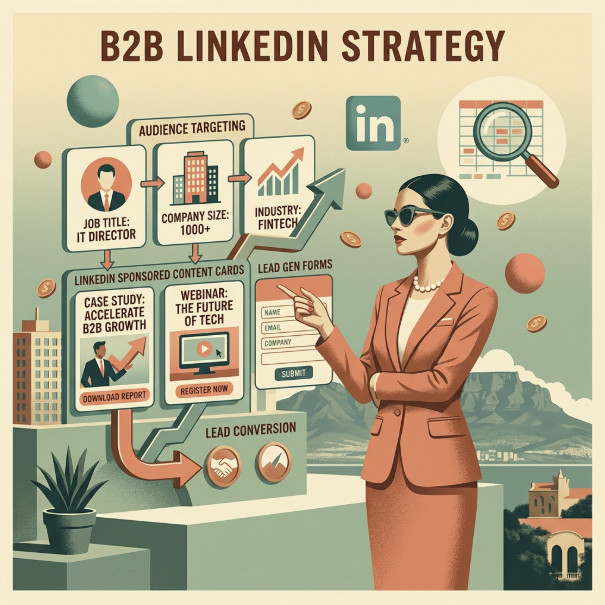
LinkedIn can put your brand on a decision-maker’s radar before anyone enters a meeting room.
LinkedIn Ads Manager, officially called LinkedIn Campaign Manager, combines professional targeting with the controls needed to plan and manage paid campaigns.
Access creates the conversation, but strategy gives it direction.
For any business considering LinkedIn advertising, the real question is whether that precision can turn professional attention into stronger leads and measurable commercial value.
The practical side of LinkedIn advertising begins here. A solid campaign structure converts your strategy into activity, then shows you which decisions shaped the results.
LinkedIn Campaign Manager brings audience selection, spending controls, ad publishing and performance reporting into one place.
Campaign Manager provides the controls. Commercial direction comes from the thinking behind them.
LinkedIn currently organises advertising activity into campaigns, ad sets and ads. Campaigns contain ad sets, while each ad set contains the ads an audience sees. The ad account contains the full structure and manages billing and access.
LinkedIn’s current guidance uses Campaigns, Ad Sets and Ads. Other online resources present the hierarchy as Campaign Groups, Campaigns and Ads.
LinkedIn divides advertising activity into campaigns, ad sets and ads. An ad account contains the campaign activity and manages billing and access.
LinkedIn’s campaign guidance explains how the platform assigns objectives, audiences, budgets and creative across this structure:
Level | What It Controls | What It Means for Your Business |
|---|---|---|
Ad Account | Billing, access and account settings | Keeps control clear before campaign spend begins |
Campaign | Shared objective, budget or schedule | Connects media investment with the intended business result |
Ad Set | Audience, format, placement and delivery | Reveals which audience and delivery choices deserve further investment |
Ad | Message, creative and call to action | Shows what earns attention and gives people a reason to respond |
Better performance starts when every campaign decision has a clear commercial purpose. Objectives, audiences and formats put that purpose into practice.
An objective tells LinkedIn what to optimise. A business goal defines what success means. A campaign can hit its platform target and still miss the commercial point.
Awareness builds familiarity within a defined market. Website visits invite closer consideration, while lead generation turns interest into a direct response. Matching the objective to the buyer journey keeps the campaign focused on the result that matters at that stage.
LinkedIn ad targeting uses professional audience data to reach people involved in business-to-business (B2B) purchasing decisions. LinkedIn’s targeting options include:
- Professional role: Job title and seniority
- Company profile: Industry and company size
- Matched Audiences: Contact lists or previous website visits used for retargeting
Precision needs perspective. Too many filters may produce an audience that looks ideal on paper but gives the campaign little room to learn. Strong targeting prioritises the characteristics that influence the buying decision.
Format should follow the message and the action you want it to prompt. Each option changes how the audience receives that message and the path they can take next.
LinkedIn offers several advertising formats, along with Lead Gen Forms:
- Single Image Ads: Present one focused proposition in the LinkedIn feed.
- Video Ads: Build familiarity or explain an idea visually.
- Carousel Ads: Develop a story across a series of swipeable cards.
- Document Ads: Let audiences explore reports, guides or thought leadership.
- Thought Leader Ads: Promote posts from company leaders or employees to build trust through individual perspectives.
- Event Ads: Promote an upcoming event and encourage registrations from relevant professional audiences.
- Message and Conversation Ads: Reach prospects through focused messages or guided content paths.
- LinkedIn Lead Gen Forms: Capture prospect details through pre-filled forms inside LinkedIn.
Purposeful spending gives a campaign enough room and time to produce evidence your business can use. Audience competition and bidding shape how far the budget goes, while duration determines whether the results reveal a reliable pattern.
A click signals interest, not commercial value. Lead quality and revenue show whether your investment creates opportunities worth pursuing.
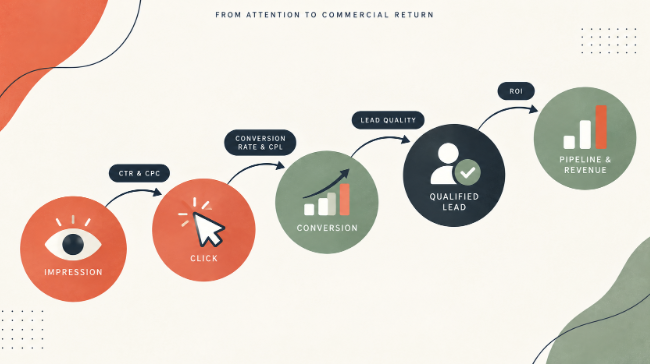
Commercial value becomes clearer beyond surface-level results:
- Click-Through Rate (CTR) and Cost Per Click (CPC): Show whether the creative attracts traffic and what the campaign pays for that attention.
- Conversion Rate and Cost Per Lead (CPL): Reveal how efficiently campaign traffic becomes leads.
- Lead Quality: Shows whether those leads have the customer fit and buying potential the sales team needs.
- Pipeline and Revenue: Connect lead generation with commercial value and return on investment (ROI).
Cheap leads aren't a bargain if the sales team cannot use them.
Campaign problems do not always live inside the ad account.
A missing or incorrectly configured LinkedIn Insight Tag can weaken conversion tracking and leave gaps in the performance picture.
Performance can lose momentum after the click. A disconnected landing page may lose the visitor’s interest, while slow sales follow-up can waste the demand the campaign created.
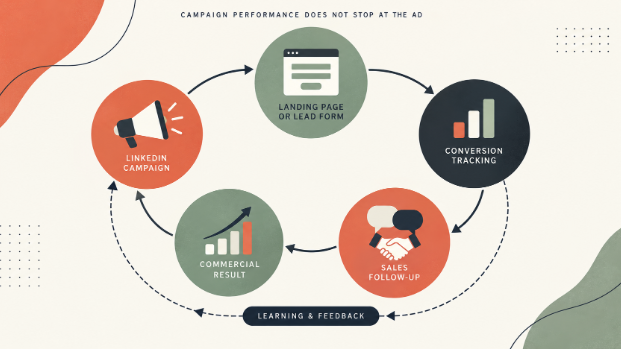
Watch for warning signs such as:
- Reporting that stops at clicks or form submissions
- Leads that fall outside the intended customer profile
- Creative that runs without structured testing
- Changes made before useful patterns emerge
- Campaign data that never reaches the sales team
When performance stalls, another settings adjustment may only rearrange the problem. Specialist management connects your ad account data with landing-page behaviour and sales feedback, so you can decide whether to refine the campaign, landing page or sales response.
Some questions deserve a straight answer before you allocate a budget to LinkedIn advertising.
LinkedIn’s platform turns campaign strategy into paid advertising activity and measurable results.
Yes. LinkedIn Campaign Manager is the official product name, but many people use LinkedIn Ads Manager to refer to the same platform.
Yes, when professional targeting can put your business in front of the people who influence or approve purchasing decisions.
Give your next campaign a clearer route from professional attention to qualified opportunities.
Explore LinkedIn advertising with Druce Digital and see what a commercially focused strategy can achieve for your business.